
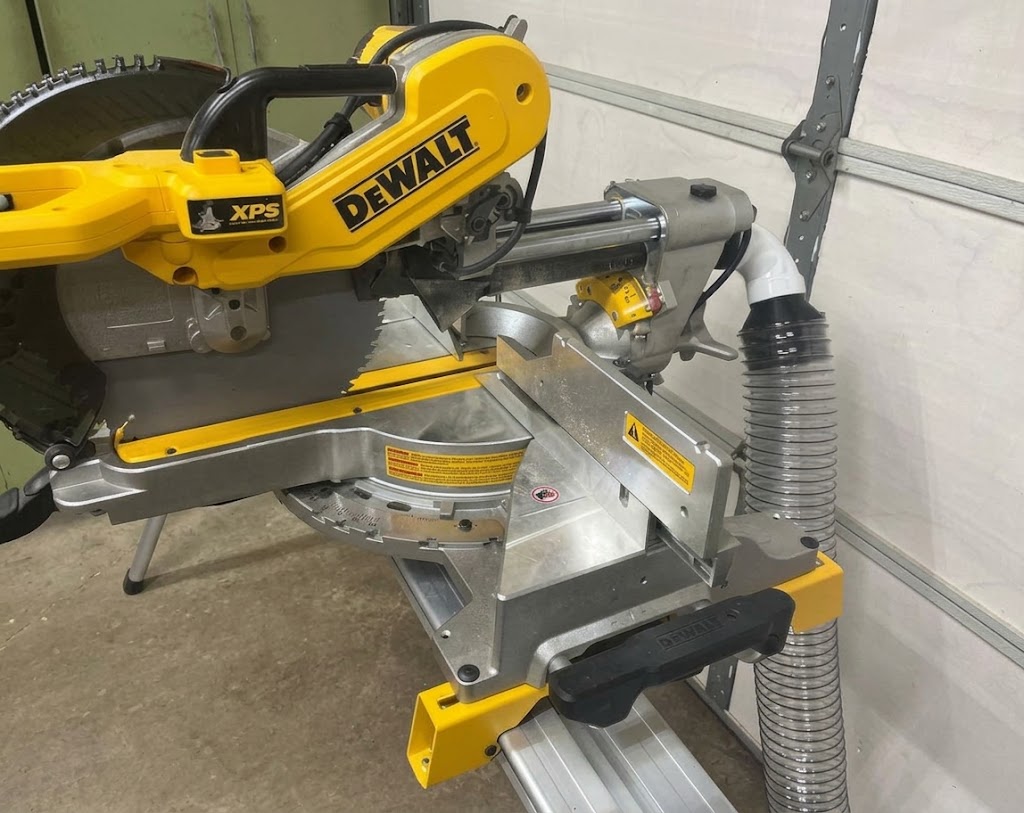
A 3D printed miter saw dust collection adapter can help solve one of the most frustrating problems in a woodworking shop: connecting a miter saw’s dust port to a shop vacuum or dust collection hose. Many saws have unusually shaped outlets, nonstandard connection sizes, or dust chutes that do not work particularly well with common vacuum fittings. A custom 3D-printed adapter, chute, or shroud can provide a more suitable connection for a particular saw.
The good news is that you do not always have to design one from scratch. Free and paid STL files are available for several popular miter saw brands, including DeWalt, Bosch, Ridgid, Kobalt, and Ryobi. Some designs are simple hose adapters, while others replace or extend the original dust collection chute.
However, finding a printable file is only the first step. You also need to confirm that it fits your exact saw model, matches your hose dimensions, and leaves enough clearance for normal saw movement.
This guide covers available miter saw dust collection STL files, how to choose a suitable design, how to measure your dust port, and how to print and install a custom adapter safely.
Watch: How 3D-Printed Miter Saw Dust Collection Works
Suggested video: How to Measure, Design, Print, and Install a Miter Saw Dust Collection Adapter.
What Is 3D-Printed Miter Saw Dust Collection?
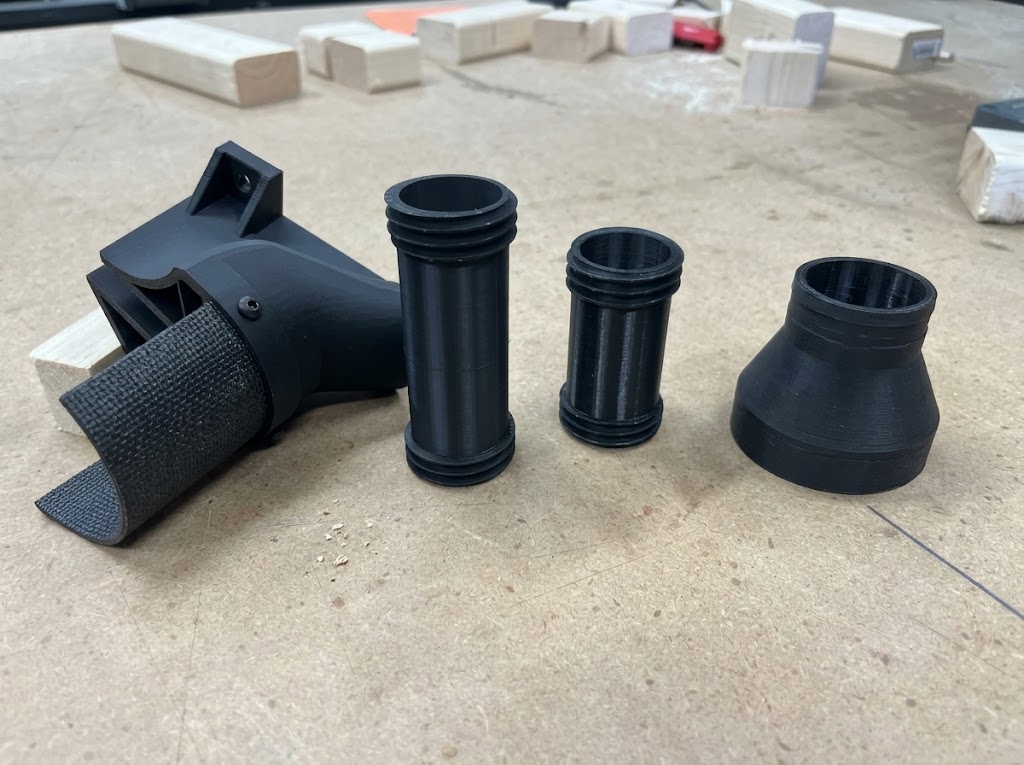
3D-printed miter saw dust collection uses a custom plastic component to improve the connection between a saw’s dust outlet and a vacuum or dust extraction hose.
A conventional adapter may not fit because the saw’s original dust port can be rectangular, oval, tapered, or an unusual size. A 3D printer makes it possible to create a fitting that matches the shape of the saw on one side and the hose on the other.
Depending on the design, a printed component can:
- Connect an existing dust port to a shop-vac hose.
- Replace an awkward or damaged dust fitting.
- Extend or redirect the original dust chute.
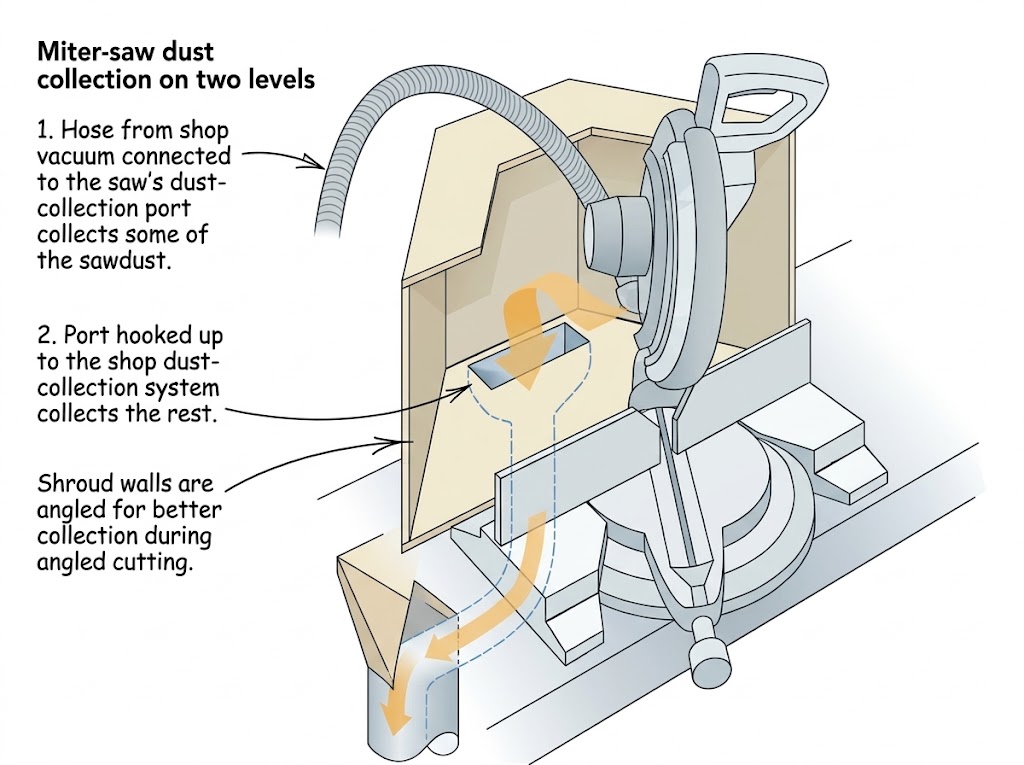
- Create a larger collection hood behind the blade.
- Provide a custom connection for a particular vacuum or dust collector.
A simple adapter does not necessarily improve dust capture around the blade. It mainly provides a better connection to the extraction hose. A larger chute or shroud may change how dust is collected, but its effectiveness depends on its shape, position, airflow, and the saw’s design.
Types of 3D-Printed Miter Saw Dust Collection Adapters
There are several types of printable designs. Understanding the differences will help you find the right STL file.
1. Dust Port Adapters
A dust port adapter connects the saw’s existing outlet to a different hose size.
For example, a saw might have a rectangular outlet while the vacuum uses a round hose. The adapter transitions between these two shapes.
These are usually the simplest designs to print and install. They are useful when the original dust port is functional but does not match the hose connection.
2. Rear Dust Collection Chutes
A rear dust chute directs debris from the blade area toward a vacuum connection.
Some designs replace the original plastic chute, while others attach to the existing collection area. Their shape and position are important because they need to collect debris without interfering with the saw’s movement.
A chute designed for one saw model should not be assumed to fit another model from the same brand.
3. Dust Collection Shrouds and Hoods
A dust collection shroud or hood surrounds a larger area near the blade to help capture dust that escapes the original outlet.
These designs can be more complicated than simple adapters. They may require more printing material, additional mounting points, and careful clearance checks.
A larger hood is not automatically more effective. Its performance depends on how close it is to the dust source and whether the extraction system can maintain suitable airflow.
4. Hose Connectors and Flexible Fittings
Some printable parts connect different hose sizes or provide a flexible connection between the saw and extraction system.
Rigid fittings can be printed from materials such as PETG. Flexible connectors may use TPU or another suitable flexible filament.
The connection should remain secure without putting excessive force on the saw’s dust port.
Free 3D-Printed Miter Saw Dust Collection STL Files by Brand
One of the most useful parts of this project is finding an existing STL file instead of designing an adapter from the beginning.
The following examples were identified during research. They are organized by brand and model where the original listing provides that information.
Important: A listing’s brand name does not guarantee compatibility with every saw from that manufacturer. Check the original creator page, model number, dimensions, and license before downloading or printing a file.
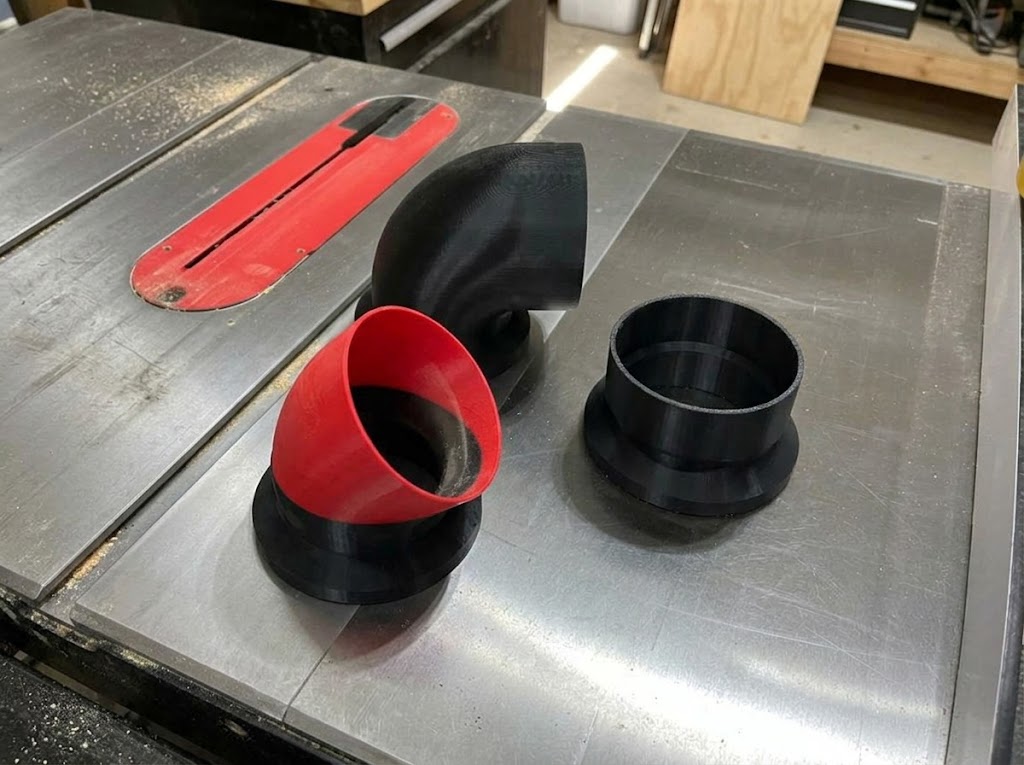
DeWalt Miter Saw Dust Collection STL Files
Several DeWalt-compatible dust collection designs appear in 3D model directories.
Dust Collector for DeWalt Miter Saw — Madary Prints
- Platform: Printables
- File status: Listed as free
- Design purpose: Dust collection attachment for a DeWalt miter saw
- Creator: Madary Prints
View the DeWalt dust collector on Printables
This is a useful starting point for DeWalt owners looking for a printable dust collection attachment. However, the listing title alone does not establish compatibility with every DeWalt model. Check the creator’s photos, description, and comments before printing.
DeWalt DW708 dust collection fitting — CoreAxisDesigns
A separate DW708 fitting is listed on Printables. This is a more model-specific example and illustrates why checking the exact saw number matters.
Find the DeWalt DW708 fitting through the model index
The index also lists other DeWalt dust collection designs, including elbows and dust extraction attachments. Use it to discover additional models, then follow the original creator link before downloading.
What about the DWS779 and DWS780?
Some model-specific dust collection chutes and adapters are advertised for the DeWalt DWS779, DWS780, DWS782, and related saws. These designs may be sold as digital files or complete printed-part kits.
Do not assume that a general DeWalt STL fits these saws. Check the exact model compatibility and whether the listing includes a complete chute, a hose adapter, or only a replacement connector.
Bosch Miter Saw Dust Collection STL Files
Miter saws from bosch also have several community-created dust collection designs.
Bosch GCM12SD magnetic dust collector — HermyNacho
A magnetic dust collection attachment for the Bosch GCM12SD is listed on Printables.
The design uses a magnetic attachment approach rather than relying only on a permanent mechanical connection. This can be useful when an attachment needs to be removed for access or storage.
Find the Bosch magnetic dust collector on the model index
Check the original listing for the magnet dimensions, mounting arrangement, and printing instructions before starting.
Bosch GCM12SD hose adapter — DuffnerD
A separate Bosch GCM12SD dust collection adapter is available on Thingiverse.
View the Bosch GCM12SD adapter on Thingiverse
This is a hose-connection design rather than necessarily a complete replacement dust hood. Check the model description and dimensions to confirm that the connection matches your setup.
Bosch Glide saws have different dust collection designs as well. Do not assume that a fitting for the GCM12SD will fit another Bosch sliding compound miter saw.
Ridgid Miter Saw Dust Collection STL Files
Ridgid owners can also find printable dust collection adapters.
Shop-vac dust collection adapter for Ridgid R4222 — Alex Dunn
- Saw model: Ridgid R4222
- Creator: Alex Dunn
- Original listing date: January 24, 2025
- File status: Listed as free
- Creator’s material recommendation: 95A TPE FLEX
- Supports: The creator states that supports are not necessary
View the Ridgid R4222 adapter listing
This design is intended to connect the R4222 miter saw to a shop vacuum. Its creator specifically recommends 95A TPE FLEX, so do not automatically substitute a rigid filament without considering how the fitting is designed to attach.
Ridgid R4210 and other models
Additional Ridgid-related adapters appear in 3D model searches. However, a listing or search result is not enough to establish exact compatibility.
If you own an R4210, R4251, or R4241, check the original creator’s model information before using a design intended for another Ridgid saw.
Kobalt Miter Saw Dust Collection STL File
Kobalt Miter Saw (0857242) dust shroud — Dcriscosu
This design is specifically listed for the Kobalt 12-inch miter saw, model 0857242.
View the Kobalt dust shroud on Cults3D
The creator describes the design as having two 2.5-inch hose ports. The listing also mentions four magnets, although the creator reports that the part can fit through friction without them.
The creator notes that one hose connection may be sufficient for a shop vacuum, while both may be useful in a dust collector setup. Treat that as the creator’s experience rather than a guaranteed airflow recommendation for every vacuum.
This is a good example of why reading the original model description is important. It provides details that are not obvious from the STL file name alone.
Ryobi Miter Saw Dust Collection STL File
Ryobi Miter Saw Vacuum Adapter (TSS102L) — nickroosen
This adapter is designed for the Ryobi TSS102L miter saw.
- Creator: nickroosen
- File status: Listed as free
- Hose connection: 1¾-inch vacuum hose
View the Ryobi TSS102L adapter on Cults3D
The creator reports using the adapter with a Ridgid 4-gallon shop vacuum. The listing also suggests that it may fit a smaller Ryobi saw, but that should be treated as an unverified possibility until the dimensions are checked.
If you own a different Ryobi model, measure the original dust port rather than assuming this adapter will fit.
Milwaukee Miter Saw Dust Collection STL File
A Milwaukee compound miter saw dust collection adapter by Needitmakeit is listed in the Thingiverse model index.
Find the Milwaukee adapter through the model index
The design is intended to connect the saw’s original dust outlet to a vacuum hose.
Before downloading, follow the index link to the original Thingiverse page and check the exact saw model, connection size, and creator instructions.
Makita Miter Saw Dust Collection STL File
A Makita LS0815F adapter is listed for connecting the saw to a Bosch C35 female dust collector connection.
Find the Makita LS0815F adapter through the model index
This is a useful example of a model-specific connection adapter. It should not be described as a complete dust collection hood unless the original design includes one.
Other Miter Saw Brands
Additional designs appear for brands such as Skil, Metabo, Admiral, and other saw manufacturers.
For example, a Skil miter saw dust collection design is listed on Printables, and other model indexes include dust collection parts for different saws.
Browse additional miter saw dust collection models
When searching for another brand, use the full saw model number along with terms such as:
miter saw dust collection STLmiter saw vacuum adaptermiter saw dust chute 3D printmiter saw dust collection adapter
A model that looks similar to your saw may still have a different dust port or mounting arrangement.
Miter Saw Dust Collection STL Compatibility Overview
| Brand | Model or design | Printable part | Important note |
|---|---|---|---|
| DeWalt | General DeWalt listing | Dust collector | Exact saw model needs confirmation |
| DeWalt | DW708 | Dust fitting | Model-specific listing |
| Bosch | GCM12SD | Magnetic dust collector | Check mounting and magnet details |
| Bosch | GCM12SD | Hose adapter | Check hose dimensions |
| Ridgid | R4222 | Shop-vac adapter | Creator recommends 95A TPE FLEX |
| Kobalt | 0857242 | Dust shroud | Creator describes two 2.5-inch ports |
| Ryobi | TSS102L | Vacuum adapter | Designed around a 1¾-inch hose |
| Milwaukee | Model to confirm | Dust collection adapter | Verify original creator listing |
| Makita | LS0815F | C35 connection adapter | Not necessarily a complete hood |
The table is a starting point for finding designs, not a guarantee that every file is still available or will fit your saw. Always use the original creator page as the final reference.
How to Choose the Right Miter Saw Dust Collection STL File
Downloading the first file that appears in a search result is not a good approach. A printed adapter needs to fit the saw, connect securely to the hose, and remain clear of moving components.
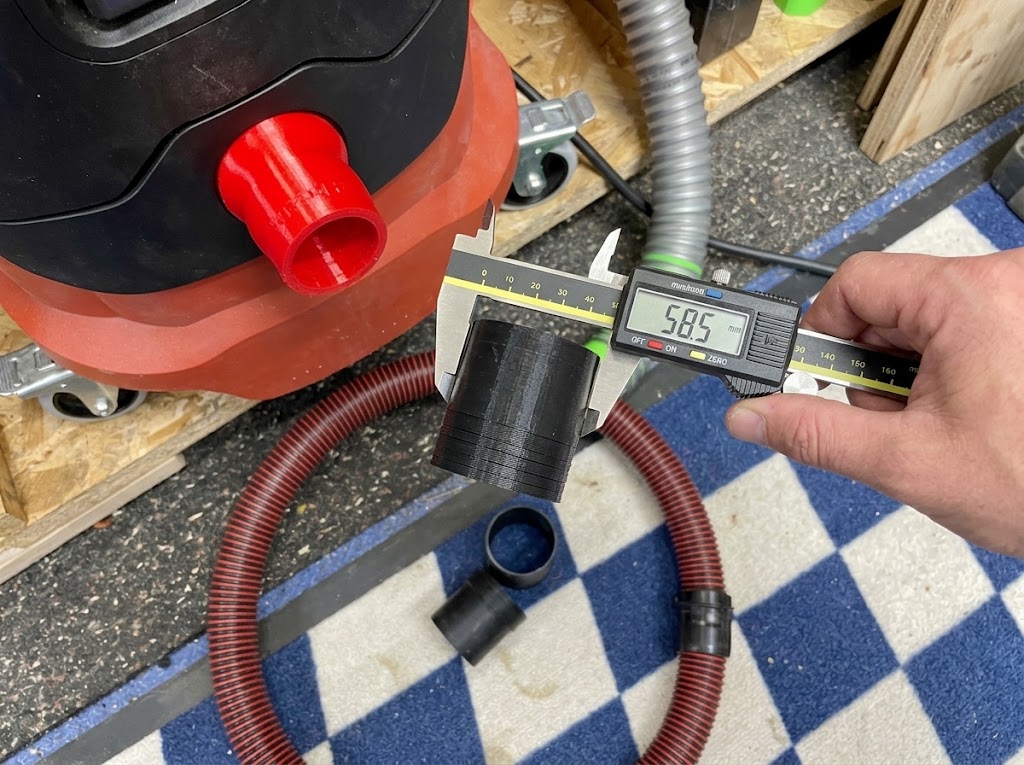
Before downloading an STL file, check the following details.
1. Confirm the Exact Miter Saw Model
Start by identifying the complete model number of your saw.
The brand name alone is not enough. Manufacturers may use different dust port shapes and mounting systems across their product ranges.
Look for the model number on the saw’s identification label or in the manufacturer’s documentation.
Then compare it with the STL listing. If the creator identifies a specific model, do not assume that the design fits other models from the same brand.
2. Check the Hose Connection Size
The saw-side opening and the hose-side opening are two separate measurements.
Check whether the design is made for:
- A shop-vac hose.
- A dust extractor hose.
- A larger dust collector hose.
- A specific proprietary connection.
A hose that appears to fit may still be too loose or too tight. The connection should be secure without requiring excessive force.
3. Check the Available Clearance
A dust collection attachment must not interfere with the normal operation of the saw.
Look for photographs or installation videos showing the part in place. Check whether it leaves room for the saw’s sliding rails, bevel movement, miter movement, blade guard, and workpiece.
A design that fits the rear dust port while the saw is stationary may still cause problems when the saw is moved through its full range.
4. Check the STL License
A free STL file is not automatically free to modify, sell, or redistribute.
Before using a design, check its license. Some creators allow personal printing but restrict commercial use. Others require attribution or impose additional conditions.
If you plan to share a modified design, follow the original license requirements and credit the creator where required.
How to Measure a Miter Saw Dust Port for a 3D-Printed Adapter
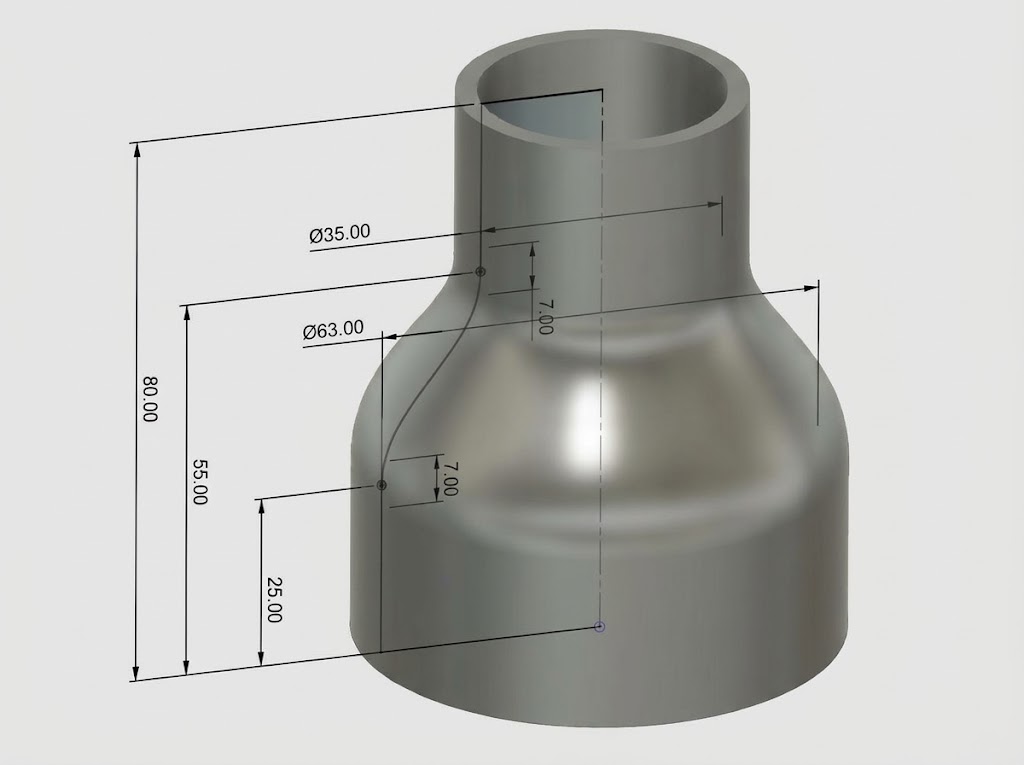
If you cannot find a suitable STL file, you may be able to design a custom adapter. Accurate measurements are the most important starting point.
A digital caliper is useful for measuring small openings and connection dimensions.
1. Measure the Dust Port Opening
First, disconnect the saw from its power source.
If the dust port is round, measure its inside diameter. If it is rectangular, measure the inside width and height.
For an oval or irregular opening, take measurements at more than one point. Do not assume the opening is perfectly symmetrical.
Record the measurements in millimeters or inches. Millimeters are often convenient when working in CAD software.
2. Measure the Hose
Measure the hose separately.
For a round hose, measure its inside diameter if the adapter is designed to fit inside the hose. Measure its outside diameter if the adapter is designed to fit over the hose.
Also check whether the hose has a tapered end, ribbed connection, locking ring, or flexible cuff.
The adapter must match the actual connection method, not just the nominal hose size printed on the packaging.
3. Measure the Insertion Depth
An adapter can have the correct opening dimensions but still fit poorly if its insertion depth is wrong.
Measure how far the original fitting enters the dust port or how much space is available for the new adapter.
A connection that is too shallow may fall off. A connection that is too deep may obstruct the internal passage or interfere with nearby components.
4. Allow for Printing Tolerances
A 3D printer does not always produce a part at exactly the same dimensions as the CAD model.
The final fit can be affected by:
- Printer calibration.
- Filament shrinkage.
- Material choice.
- Print orientation.
- Layer height.
- The shape of the connection.
For a custom design, it is often sensible to print a small test section of the connection before printing the entire adapter.
Do not force a part into the saw’s original port if the fit is incorrect.
How to Design a Custom 3D-Printed Miter Saw Dust Collection Adapter
If no existing STL file fits your saw, designing a custom adapter is another option.
You do not necessarily need to create a complicated dust collection hood. A basic adapter can be built from three main sections.
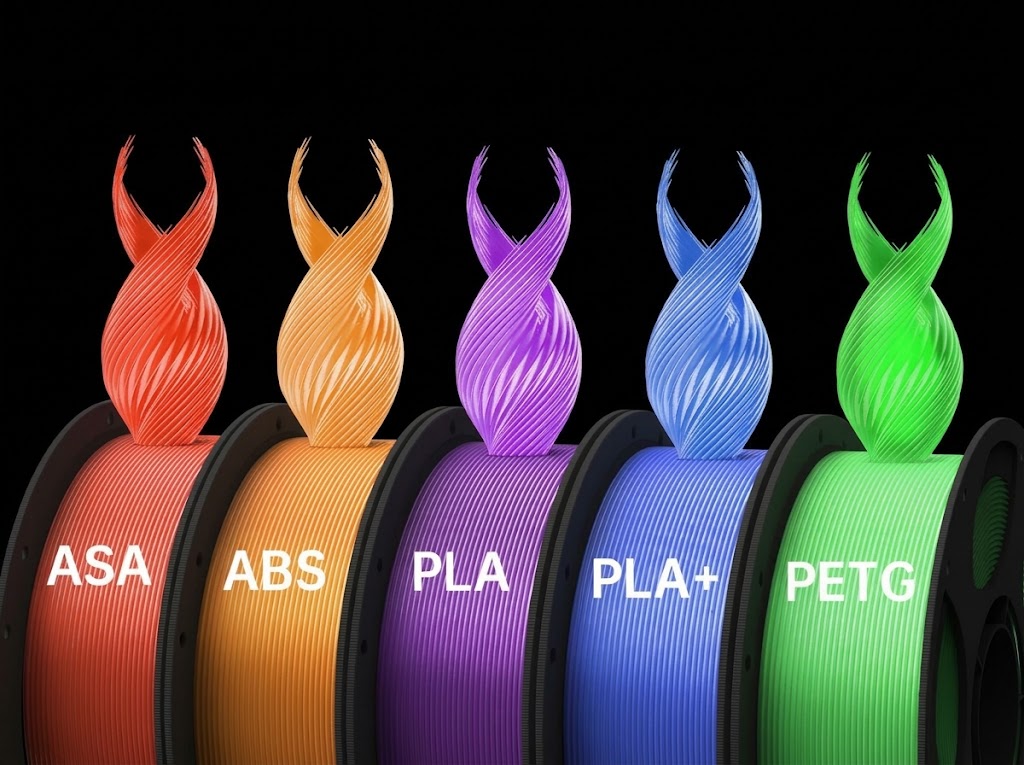
1. Design the Saw-Side Connection
Start with the measurements of the original dust port.
Create a shape that matches the port’s opening and connection method. Depending on the saw, this could be round, rectangular, oval, or an irregular shape.
The connection should be secure without putting excessive pressure on the original plastic port.
2. Create the Transition Section
The transition section connects the saw-side opening to the hose-side opening.
For example, it may gradually change from a rectangular opening to a round hose connection.
Avoid unnecessary restrictions or sudden internal steps. A smooth transition is generally preferable because it reduces abrupt changes in the airflow path.
However, a smooth-looking adapter alone does not guarantee effective dust collection. The overall extraction system and collection geometry still matter.
3. Add the Hose Connection
The hose-side end should match the actual hose dimensions.
Depending on the setup, the connection might use:
- A slip-fit opening.
- A tapered connector.
- A raised locking ring.
- A clamp-compatible section.
- A flexible connector.
Consider how the hose will be attached and removed. A fitting that is difficult to disconnect may become inconvenient during normal workshop use.
4. Use Parametric CAD Design
Parametric design makes it easier to adjust the dimensions of an adapter without rebuilding the entire model.
For example, you can define parameters for:
- Dust port width.
- Dust port height.
- Hose diameter.
- Adapter length.
- Wall thickness.
- Insertion depth.
If you discover that the hose opening is slightly too small, you can change the parameter and export an updated STL file.
Fusion 360 is one option for this type of work. Other CAD programs can also be used, provided they allow you to create and export a suitable 3D model.
5. Export and Check the STL File
Once the design is complete, export it as an STL file.
Open the exported model in your slicer and inspect the shape before printing. Check for missing faces, unexpected openings, thin walls, or unsupported sections.
It is also useful to compare the model dimensions in the slicer with your original measurements.
Best Filament for 3D-Printed Miter Saw Dust Collection Adapters
The right filament depends on the design and how the part will be used.
A dust collection adapter may experience vibration, repeated hose connections, accidental knocks, and temperature changes. A material that is easy to print is not automatically the best choice for every application.
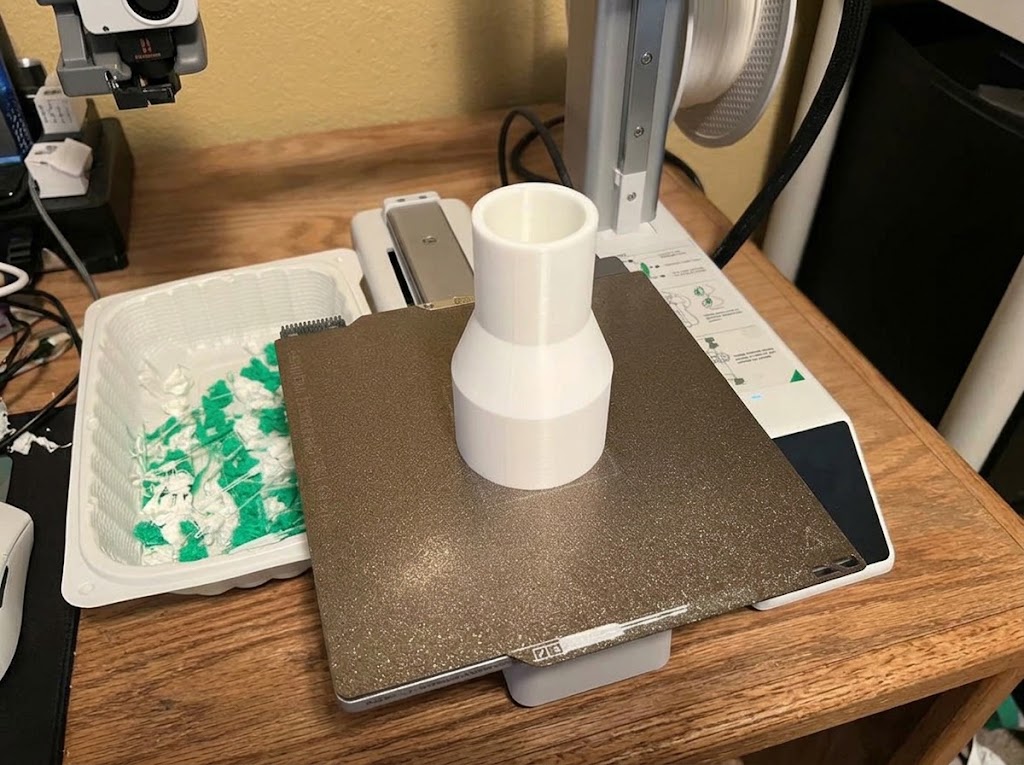
PLA
PLA is popular because it is relatively easy to print and can produce accurate parts.
It may be suitable for prototypes, measurement tests, and some lower-stress indoor fittings.
However, PLA has lower heat resistance than materials such as PETG and ASA. A part exposed to elevated temperatures or repeated mechanical stress may deform or become brittle.
For a functional adapter, consider the operating environment before choosing PLA.
PETG
PETG is a practical option for many functional 3D-printed parts.
Compared with ordinary PLA, it generally offers better toughness and temperature resistance while remaining reasonably accessible for many desktop printers.
It can be a suitable starting material for a rigid hose adapter or dust collection fitting, provided the design and operating conditions are appropriate.
TPU
TPU is a flexible filament that can be useful for connectors that need to bend or grip another component.
The Ridgid R4222 adapter discussed earlier is one example where its creator specifically recommends 95A TPE FLEX.
Flexible materials can be useful, but they may require slower printing and different slicer settings. Follow the filament manufacturer’s recommendations and the original model creator’s instructions.
ASA
ASA is a more technical material with good heat and UV resistance.
It may be suitable for more demanding rigid parts, but it is generally more difficult to print than PLA or PETG. Warping and enclosure requirements should be considered.
For a typical indoor miter saw adapter, ASA may not be necessary unless the application’s temperature or environmental conditions justify it.
Filament Comparison
| Material | Main advantage | Main limitation | Potential use |
|---|---|---|---|
| PLA | Easy to print | Lower heat resistance | Prototypes and lower-stress parts |
| PETG | Toughness and practical printability | Can still deform under heat | Rigid adapters |
| TPU | Flexible and resilient | More demanding to print | Flexible connectors |
| ASA | Heat and UV resistance | More demanding printing conditions | More demanding rigid parts |
There is no universal best filament for every miter saw dust collection adapter. Check the original design’s material recommendation, the filament data sheet, and the conditions in which the part will operate.
For additional material information, see the Prusa Filament Material Guide.
3D Printing Settings and Orientation for Dust Collection Adapters
The printing settings should be selected according to the model, filament, printer, and expected mechanical load.
A setting that works for one adapter may not work for another.
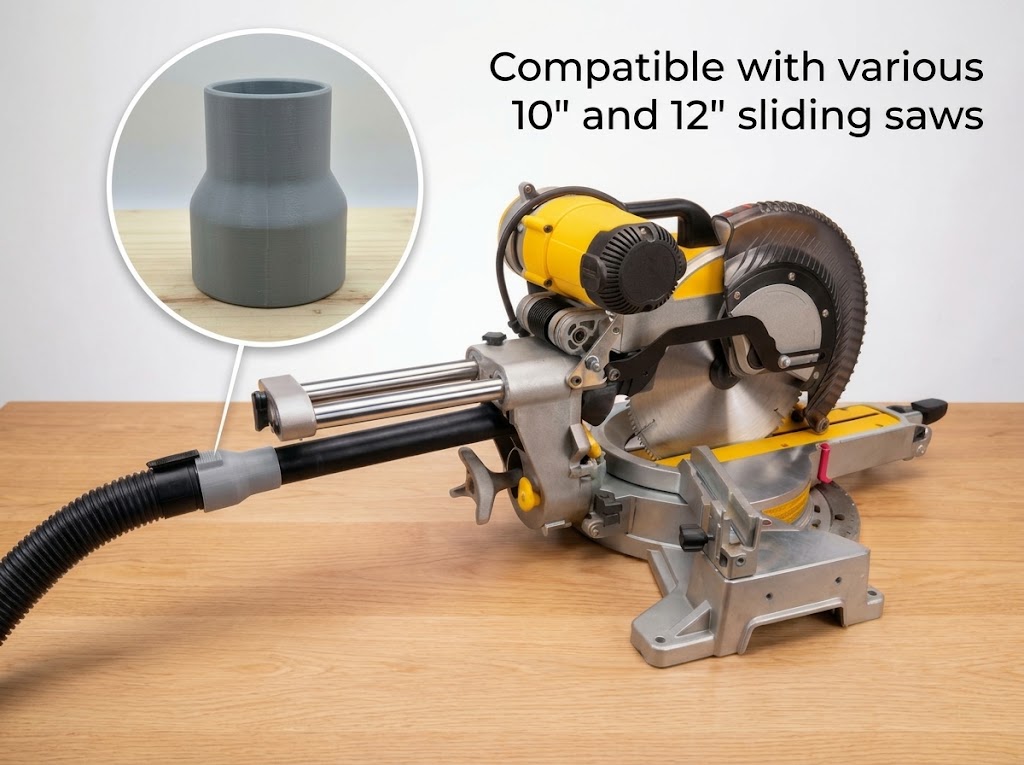
Choose the Correct Print Orientation
Print orientation affects how the layers are arranged and how the part handles mechanical stress.
Consider:
- The direction of force from the attached hose.
- The strength of the connection area.
- The number of overhangs.
- The amount of support material required.
- The surface finish inside the airflow passage.
Try to avoid placing important connection features in an orientation that makes them especially vulnerable to layer separation.
Use Suitable Wall Thickness and Perimeters
The outer walls form much of the structure of a printed adapter.
A part with too few walls may crack around a hose connection or mounting point, even if it has a relatively high infill percentage.
For functional parts, pay attention to the wall thickness specified by the original creator. If you are designing your own adapter, consider the mechanical loads and connection geometry rather than choosing a wall thickness at random.
Select an Appropriate Infill
Infill adds internal support, but more infill does not automatically make a part stronger in every direction.
For a hollow dust collection adapter, the shell and connection geometry may matter more than filling the entire interior.
Use the original creator’s settings as a starting point when available. Adjust only after considering the part’s design and intended use.
Check Support Requirements
Some adapters can print without supports, while others have overhangs or internal shapes that require them.
Check the model preview in your slicer before printing. Supports inside a narrow airflow passage can be difficult to remove and may leave a rough surface.
Follow the Original Creator’s Settings
If a model creator provides a recommended filament, orientation, or support setting, begin with that information.
For example, the Ridgid R4222 adapter creator recommends 95A TPE FLEX and states that supports are not necessary. That guidance applies to that particular design, not every Ridgid adapter.
How to Install a 3D-Printed Miter Saw Dust Collection Adapter
Once the part is printed, take time to inspect and test the fit before using the saw.
1. Disconnect the Saw from Power
Unplug the saw before removing the original dust fitting or installing the printed part.
Do not work around the blade or moving components while the saw is connected to power.
2. Inspect the Printed Adapter
Check the finished part for:
- Cracks.
- Gaps between layers.
- Warped connection surfaces.
- Thin or incomplete walls.
- Rough edges that could obstruct the connection.
Do not use a damaged or poorly printed adapter.
3. Test the Saw-Side Fit
Position the adapter against the original dust port.
It should fit securely without excessive force. If it is too loose, too tight, or does not sit correctly, stop and correct the fit.
Do not use glue or permanent modifications to force an incompatible design into place.
4. Connect the Dust Collection Hose
Attach the correct hose to the adapter.
Depending on the design, the connection may use friction, a clamp, a locking feature, or a flexible cuff.
Make sure the hose is supported and cannot pull the printed part away from the saw.
5. Check the Full Range of Saw Movement
This is one of the most important installation steps.
With the saw still disconnected from power, carefully check:
- Full sliding movement.
- Miter adjustment.
- Bevel movement.
- Blade guard clearance.
- Workpiece and fence clearance.
- Hose movement throughout the saw’s range.
The hose should not catch, stretch excessively, or pull against moving parts.
Never remove or disable the blade guard or another safety device to make a printed adapter fit.
6. Perform a Cautious Test
After completing the unplugged inspection, reconnect the saw and follow the manufacturer’s operating and safety instructions.
Start cautiously and check that the hose remains connected and does not interfere with the saw.
Stop immediately if the adapter moves, cracks, loosens, or contacts any moving component.
Common Problems With 3D-Printed Miter Saw Dust Collection Adapters
Even a well-designed STL file may need adjustments for a particular printer, hose, or saw.
Here are some common problems and what to check.
The Adapter Does Not Fit the Dust Port
Possible causes include:
- The STL file was designed for a different saw model.
- The original dust port was measured incorrectly.
- The printed part has dimensional differences.
- The insertion depth is incorrect.
Check the model number and measurements before changing the design.
The Hose Keeps Falling Off
A loose hose connection may result from an incorrect diameter, a poor friction fit, or a missing clamp or locking feature.
Measure the hose and adapter separately. If necessary, redesign the connector to use a suitable clamp or another secure connection method.
The Adapter Cracks or Separates Along the Layers
Layer separation can happen when the part is printed in an unsuitable orientation, has insufficient wall strength, or experiences excessive mechanical stress.
Inspect the connection area and consider changing the orientation, wall design, or material.
Do not continue using a cracked adapter.
Dust Still Escapes Around the Saw
A hose adapter cannot capture dust that never reaches the original dust port.
Miter saws can throw debris in several directions, and their original collection systems vary considerably.
If dust escapes around the blade area, the problem may involve the saw’s collection geometry, the position of the extraction opening, insufficient airflow, or leakage.
A larger chute or hood may be worth investigating, but it must be designed around the particular saw and must not interfere with its safety features.
Do 3D-Printed Miter Saw Dust Collection Adapters Actually Work?
They can be useful, but the result depends on what the printed part is designed to do.
A simple hose adapter can solve a connection problem. It may allow a shop vacuum or dust collector to connect securely to a saw that previously had no suitable hose fitting.
A larger chute or shroud has a different purpose. It attempts to collect more debris near the blade area before it spreads around the workshop.
However, a printed adapter does not automatically improve the saw’s overall dust collection performance.
Several factors affect the result:
The original saw design: Some saws have better dust collection geometry than others. An adapter cannot completely correct an inefficient collection system.
The position of the collection opening: Dust needs to reach the extraction opening. A connection placed too far from the main debris path may have limited benefit.
The extraction system: The vacuum or dust collector needs to provide suitable airflow for the application. A restrictive hose, clogged filter, or poorly designed connection can reduce performance.
The quality of the fit: Gaps and loose connections can allow air to enter or dust to escape.
The shape of the adapter: Abrupt restrictions and poorly designed transitions may affect airflow.
There is no reliable universal dust-capture percentage for 3D-printed miter saw adapters. Unless a particular design has been tested under controlled conditions, its performance should not be described using a specific efficiency figure.
The best approach is to treat a printed adapter as one component of the complete dust collection system, not as a guaranteed solution by itself.
Safety Considerations When Using 3D-Printed Dust Collection Parts
Dust collection is important, but the attachment must never compromise the safe operation of the saw.
Keep these points in mind:
- Never remove or disable the blade guard or other safety devices.
- Check the full range of saw movement before reconnecting power.
- Keep hoses away from the blade, rails, and moving components.
- Inspect printed parts regularly for cracks, deformation, and layer separation.
- Do not use a loose adapter that could detach during operation.
- Avoid designs that obstruct the blade area or workpiece.
- Use suitable dust extraction and respiratory protection when necessary.
Wood dust is a health hazard, and a hose adapter alone does not provide complete exposure control. OSHA identifies local exhaust ventilation that captures dust at or near its source as a primary engineering control for woodworking dust.
For more information, see OSHA’s guidance on wood dust control.
A printed part should be considered an accessory to a properly designed extraction system, not a replacement for effective workshop dust control.
Frequently Asked Questions
Can You 3D Print a Miter Saw Dust Collection Adapter?
Yes. A 3D printer can produce a custom adapter that connects a miter saw’s dust port to a shop-vac hose or dust collection hose. The design needs to match the exact saw model and hose dimensions.
Where Can I Find Free Miter Saw Dust Collection STL Files?
Printables, Thingiverse, Cults3D, and other 3D model platforms contain miter saw dust collection designs. Search by the full saw model number, then check the original creator listing for compatibility, dimensions, and license information.
What Is the Best Filament for a Miter Saw Dust Collection Adapter?
PETG can be a practical choice for many rigid adapters because it offers a useful combination of toughness and printability. TPU may be suitable for flexible connectors, while PLA can work for prototypes or less demanding applications. The correct choice depends on the design and operating conditions.
Can I Use a 3D-Printed Adapter With a DeWalt DWS779 or DWS780?
Only if the design specifically supports the relevant saw model and its dust port dimensions. A general DeWalt adapter should not be assumed to fit the DWS779 or DWS780.
Is There a 3D-Printed Dust Collector for the Bosch GCM12SD?
Yes. Research identified a magnetic dust collector design and a separate hose adapter for the Bosch GCM12SD. Check each original listing to determine which type is appropriate for your setup.
Can I 3D Print a Ridgid Miter Saw Dust Collection Adapter?
Yes. A shop-vac adapter for the Ridgid R4222 is one example. Its creator recommends 95A TPE FLEX. Other Ridgid models require separate compatibility checks.
How Do I Measure a Miter Saw Dust Port?
Use a digital caliper to measure the inside diameter of a round port or the inside width and height of a rectangular port. Also measure the hose connection and the required insertion depth.
Does a 3D-Printed Adapter Improve Dust Collection?
It can improve the connection between the saw and the extraction hose. However, a simple adapter does not necessarily capture more dust around the blade. The result depends on the saw’s original design, the adapter’s shape, and the extraction system.
Can I Use PLA for a Miter Saw Dust Collection Adapter?
PLA may be suitable for a prototype or a lower-stress application, but it has lower heat resistance than materials such as PETG and ASA. Consider the operating environment and the creator’s material recommendation before using it for a functional part.
Do I Need a Complete Dust Chute or Just a Hose Adapter?
If the original dust port already collects debris reasonably well but does not fit your hose, a simple adapter may be enough. If dust escapes around the blade area, a more extensive chute or shroud may be worth investigating. Any replacement or additional part must preserve the saw’s full movement and safety features.
Final Thoughts
3D printing gives miter saw owners another way to solve dust collection connection problems. Instead of trying several generic fittings, you can find a model-specific STL file or design an adapter that matches your saw and hose.
Start by checking the exact saw model. Then compare available designs, measure the dust port, and confirm the hose connection. If no suitable file exists, a custom CAD design can provide a more tailored solution.
Remember that a printed adapter is only one part of the dust collection system. Its fit, material, shape, and installation all matter. Most importantly, it must never interfere with the blade guard or normal movement of the saw.
A carefully selected and correctly installed adapter can make your workshop setup more practical, but safe operation and effective dust extraction should always come first